

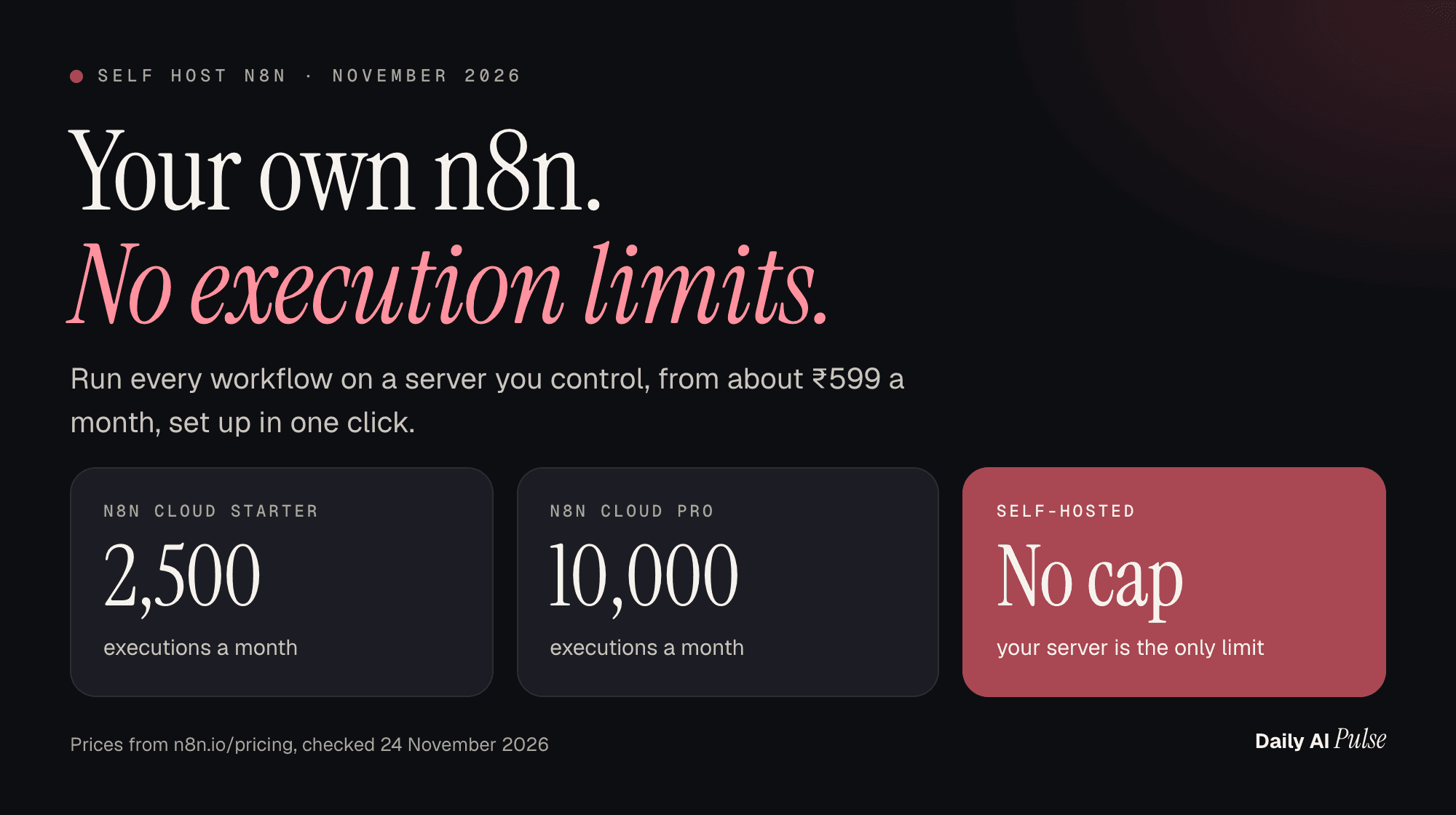
A workflow that checks something every 15 minutes runs 2,880 times a month. n8n Cloud's Starter plan, at €20 a month, includes 2,500.
I ran into exactly that kind of wall on n8n Cloud. That's why my n8n now runs on my own Hostinger server, with no execution limit at all.
In this post I'll show you how to self host n8n, the way I'd explain it to a friend over chai: what it costs compared with Cloud, the one-click Hostinger setup step by step, and the few habits that keep a self-hosted n8n safe. You don't need to be a server expert, and you don't need to write code. If you can click through a control panel, you can do this.
What is n8n?
n8n (you say it "n-eight-n") is a tool that connects your apps and does repetitive work for you. Instead of copying data from your email into a sheet every morning, you build a small machine once and let n8n run it.
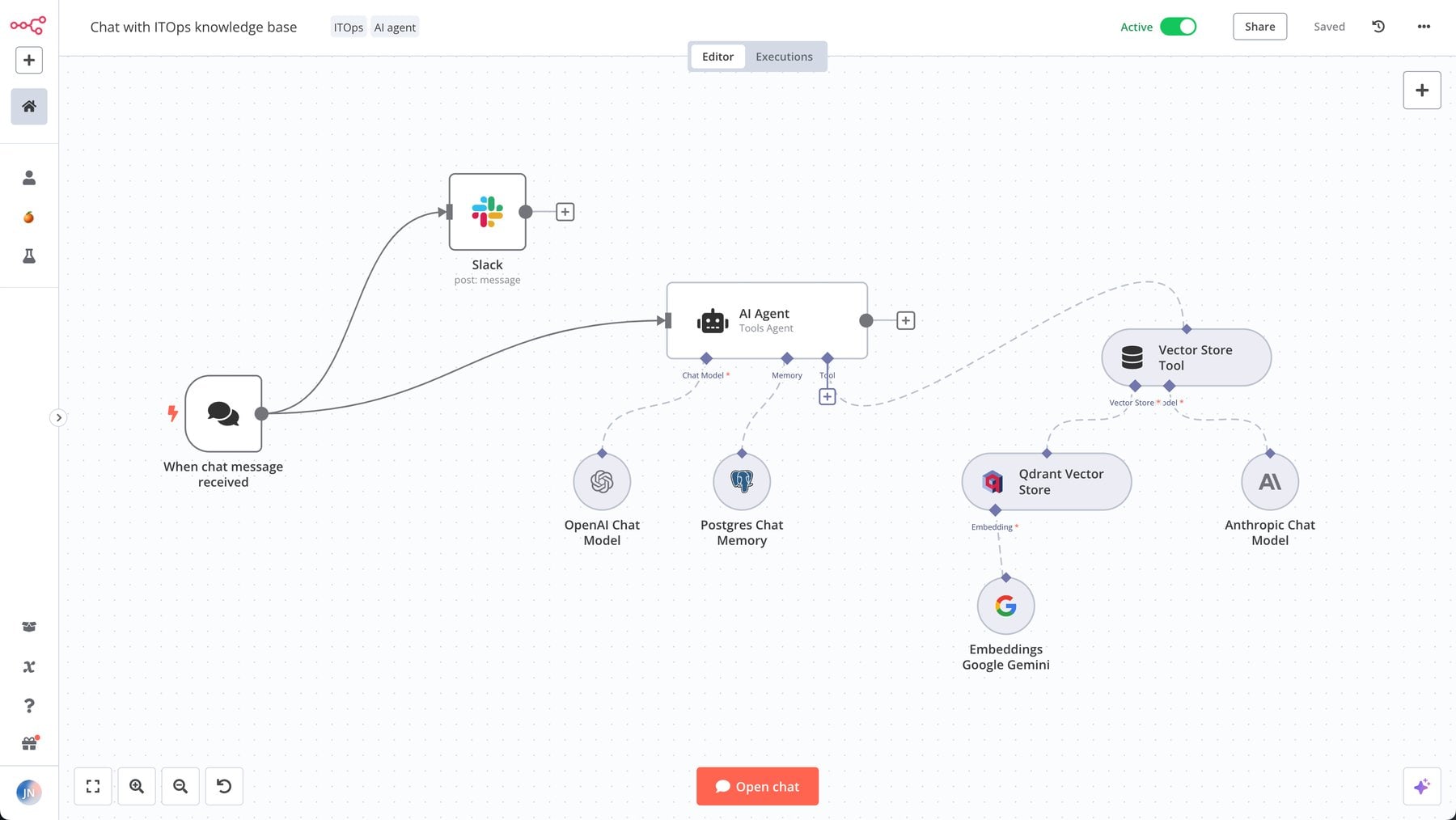
You build that machine as a workflow on a canvas, without writing code. Each step is a box called a node, and you join the nodes with lines so data flows from one step to the next. Here's a real n8n workflow that answers Slack messages with an AI agent:
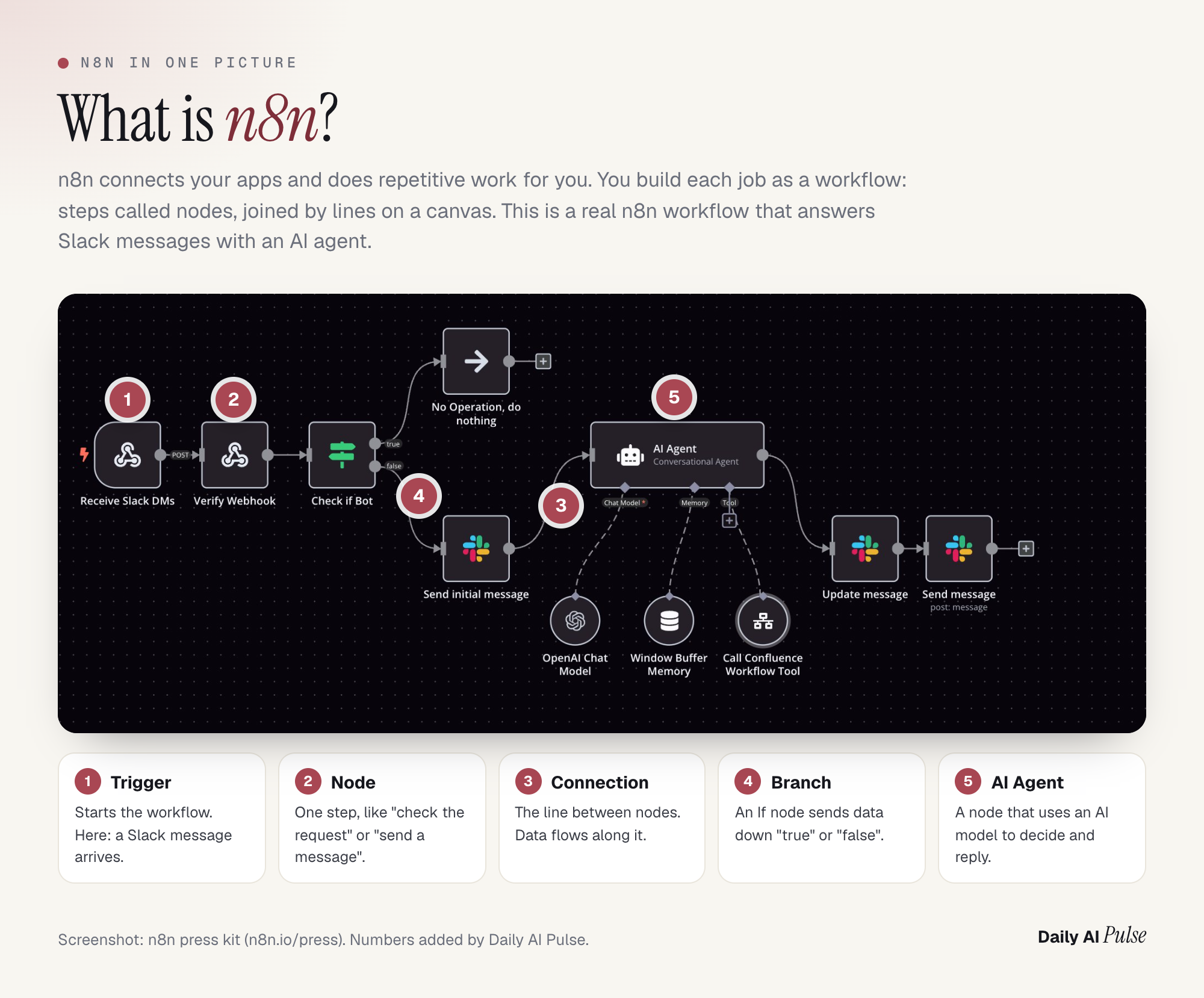
Every workflow starts with a trigger, the node that decides when it runs: a time of day, a new email, a form being filled, or another app calling it. After that, each node does one job. n8n has hundreds of ready-made nodes for apps like Gmail, Google Sheets, Slack, Telegram, Notion and GitHub, plus AI nodes that can read, decide and reply.
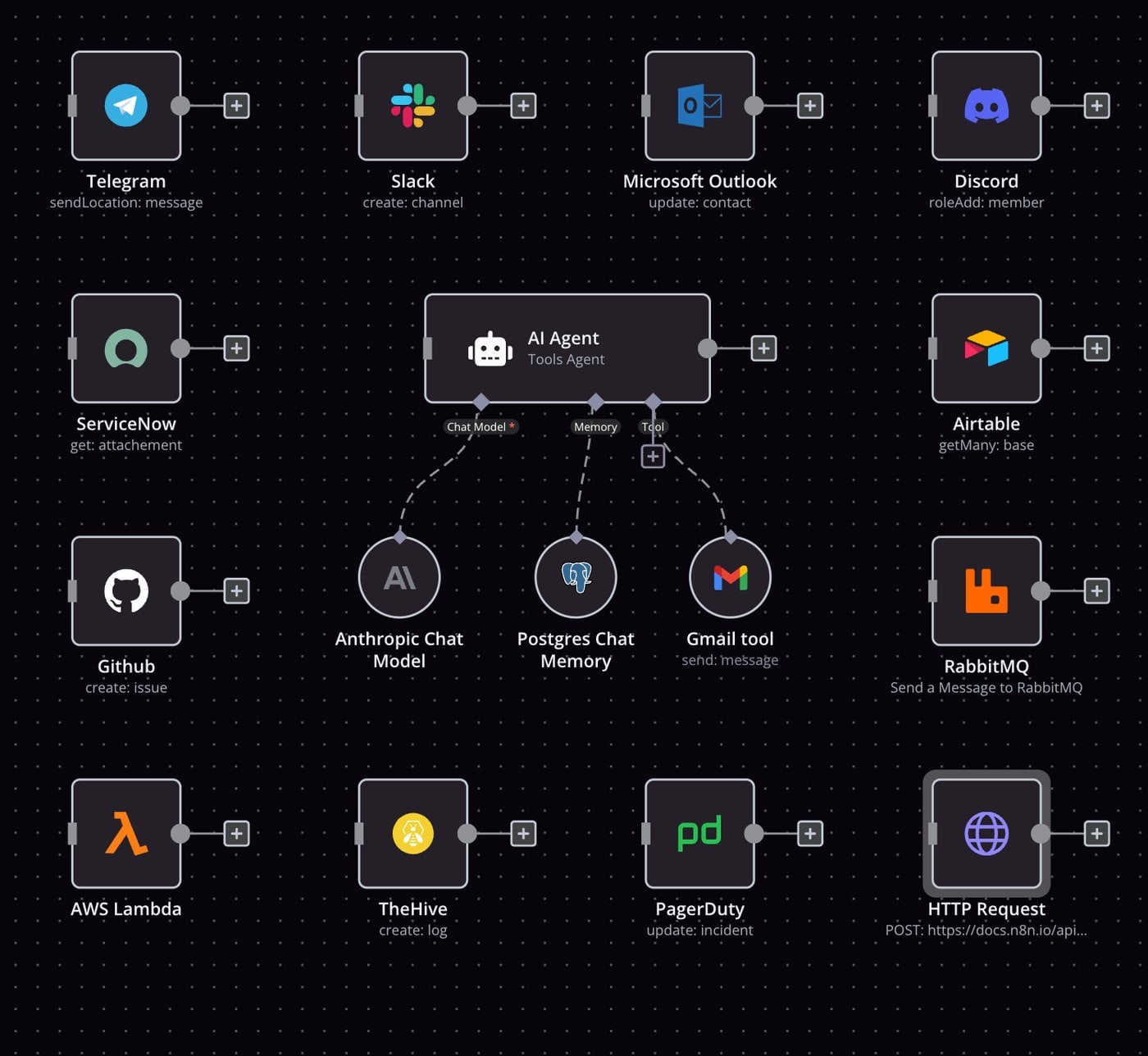
Screenshots: n8n press kit.
What does it mean to self host n8n?
Self-hosting n8n means you run the n8n software on a computer you control, instead of using n8n Cloud, the version n8n runs for you.
Think of n8n Cloud as a desk in a co-working space. The Wi-Fi, the cleaning and the security guard are included, and you just walk in. But you pay for what you use, and the house rules decide how much you can do. Self-hosting is renting your own small office. The rent is fixed and you can use it as much as you like, but you lock the door and change the bulbs yourself.
The software is the same in both. n8n publishes its code and lets you run it yourself for free under its own licence, which n8n calls "fair-code". Your workflows, nodes and integrations work exactly as they do on Cloud.
The "computer you control" is usually a VPS (virtual private server). A VPS is a slice of a big computer in a data centre that you rent by the month. It has its own address on the internet and it never switches off, which is what you want for workflows that must run at 3 a.m.
n8n Cloud vs self-hosted: what you really pay
n8n Cloud charges you by executions, and the free self-hosted version of n8n has no execution quota. An execution is one full run of a workflow, however many steps it has. Check a website every 15 minutes, and that's 96 executions a day.
Every execution shows up as one line in n8n's Executions list, with its time, how long it ran and whether it worked. On n8n Cloud, this is the list that counts towards your plan:
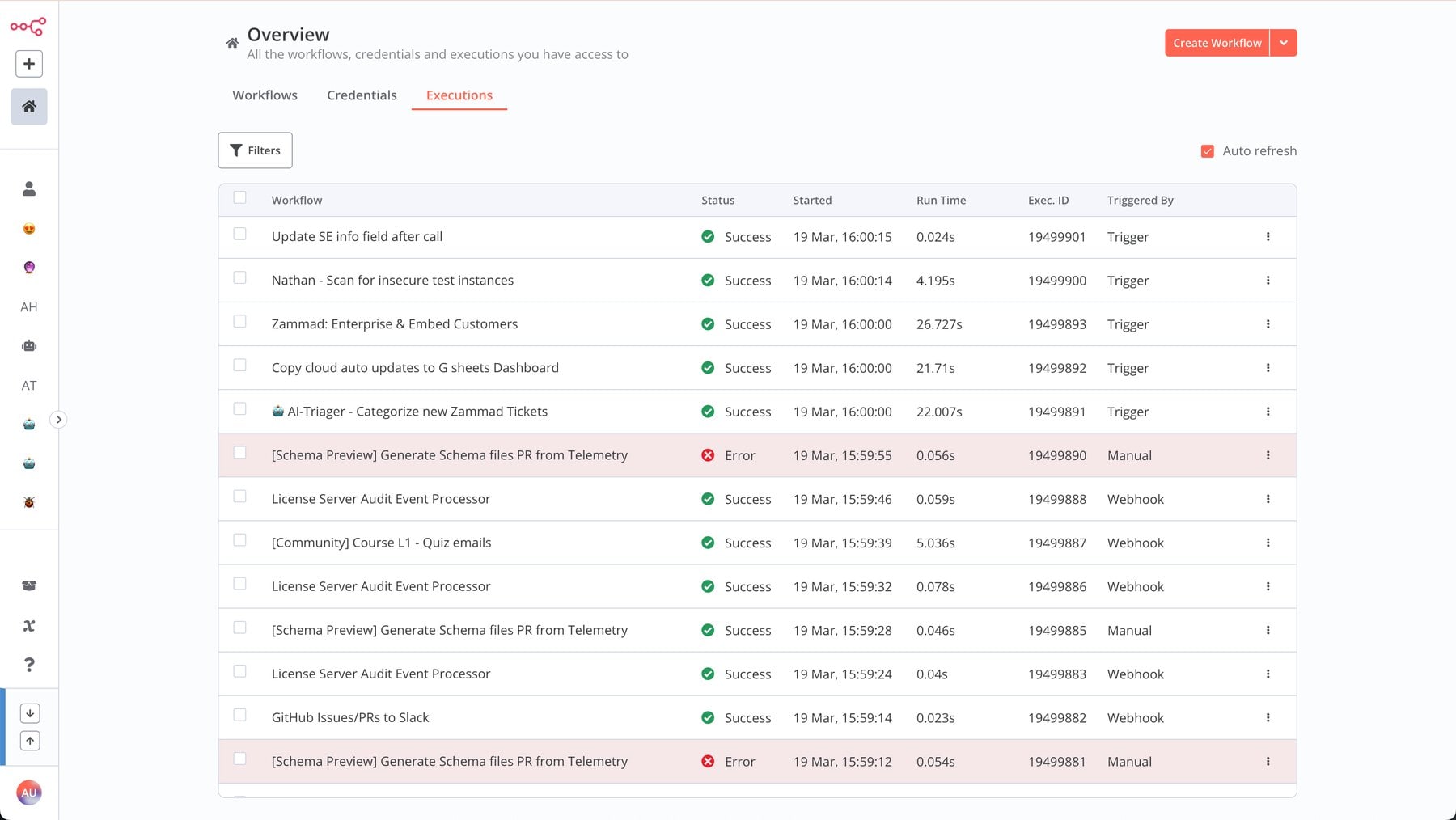
Screenshot: n8n press kit.
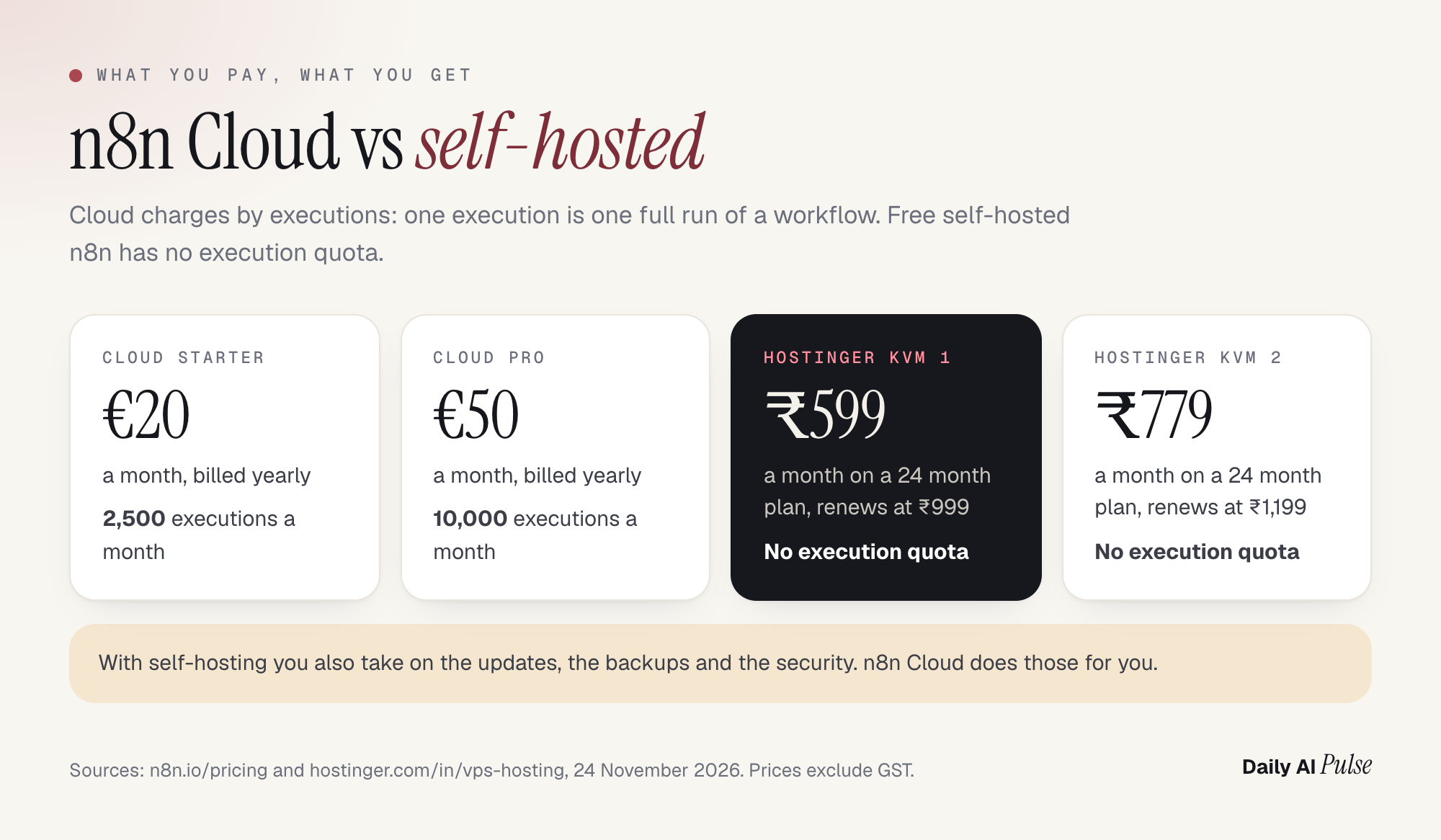
These are the prices on n8n's pricing page on 24 November 2026, billed yearly. Monthly billing costs a bit more: €24 for Starter and €60 for Pro. Both plans are capped, so when you run out, the only way to get more executions is a bigger plan. The free Cloud trial lasts 14 days and includes 1,000 executions.
Self-hosting works differently. n8n's paid self-hosted plans (Business and Enterprise) are also priced by executions, but the free self-hosted version, which n8n calls the Community Edition, has no execution quota to buy. Your limit becomes the power of your server, not a counter on a billing page.
Self-hosting isn't free of effort, though. n8n's own docs say they recommend self-hosting "for expert users", because "mistakes can lead to data loss, security issues, and downtime." A one-click template removes most of the hard parts, and the rest of this post walks you around the few that are left.
What the free licence allows. n8n's licence FAQ says that if workflows are only created or changed by you or people in your organisation, you can use n8n for free. You can run your business on it, build automations for clients on your own n8n (as long as the clients can't create or edit them), and charge for building and maintaining workflows. What you can't do is host n8n as a service where your clients build their own workflows, or remove n8n's branding and resell it. A few team features, like single sign-on, Git version control and sharing workflows between users, need a paid licence. Registering your email for free adds folders and better debugging tools.
Where to self host n8n
The easiest way to self host n8n is a VPS with a one-click n8n template. You get your own server, but the provider installs n8n and HTTPS for you, so there's nothing to set up by hand.
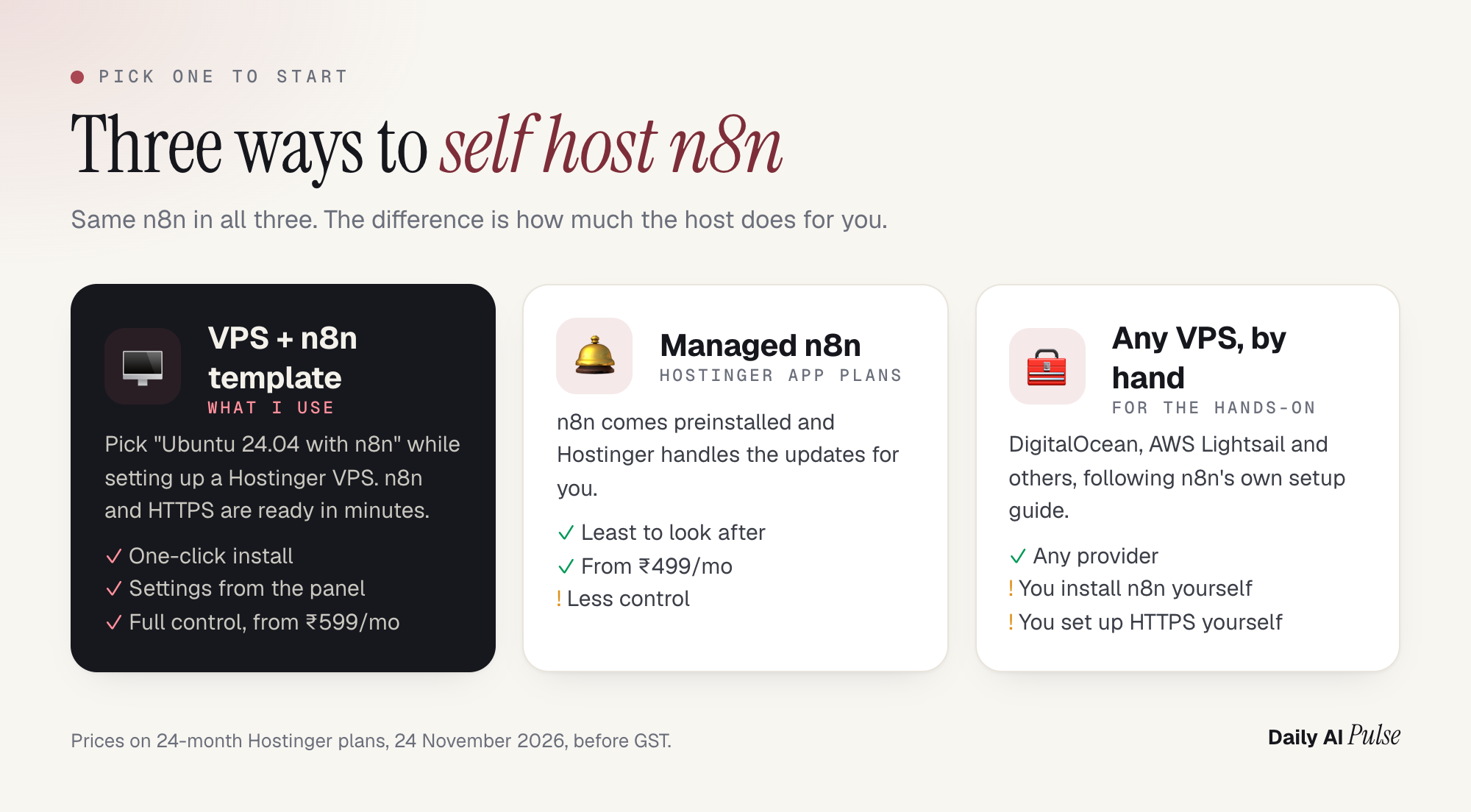
A Hostinger VPS with the n8n template is what I use. You pick n8n while setting up the server, and a few minutes later it's online with HTTPS. Hostinger bills in rupees and has a data centre in India, and everything after the install happens in its control panel.
Hostinger's APP plans go one step further. n8n comes preinstalled (from ₹499 a month on a 24-month plan) and Hostinger handles the updates for you. You get less control, and less to look after.
Any other VPS works too, like DigitalOcean (which has a Bangalore data centre) or AWS Lightsail (Mumbai), using n8n's own setup guide. There's no one-click template there, so you install n8n and set up HTTPS yourself. I'd only pick this if you're comfortable on a Linux command line.
One thing to skip: you may find old videos about an "n8n Desktop" app. n8n stopped developing it in 2023.
How to self host n8n on a Hostinger VPS
To self host n8n on Hostinger, buy a KVM VPS, choose the Ubuntu 24.04 with n8n template, open your n8n address and create your account. The template installs n8n and sets up HTTPS for you, so there's no server setup to do by hand.
Pick a plan. On 24 November 2026, KVM 1 costs ₹599 a month for 1 CPU core, 4 GB of RAM and 50 GB of storage. KVM 2 costs ₹779 for 2 cores, 8 GB and 100 GB. Hostinger's own n8n sizing guide calls KVM 1 a solid start for testing and personal use, and says KVM 2 exceeds its recommendations for production workflows. Read the small print, though: these are sale prices for a 24-month plan paid upfront (₹14,376 for KVM 1, before GST), and they renew at ₹999 and ₹1,199 a month. Choose India as the server location. It's fixed after setup, and moving it later means reinstalling, which wipes the server.
Choose the n8n template. During setup, Hostinger asks for a server location and an operating system. Pick Ubuntu 24.04 with n8n. That's the one click. (There's also a "queue mode" version for heavy workloads; you don't need it to start.) If you already have a Hostinger VPS, you can switch it in OS & Panel → Operating System, but that deletes everything on the server, so only do it on an empty one.
Open n8n and create your account. Setup usually takes a few minutes. Your n8n then lives at https://n8n. followed by your server's name, something like https://n8n.srv123456.hstgr.cloud. You can open it from Docker Manager → Projects → Open in Hostinger's panel, or with Manage App on the VPS Overview page. The padlock already works, because the template includes Traefik, a small program that sits in front of n8n like a receptionist and gets a free HTTPS certificate from Let's Encrypt. Create your owner account. n8n then offers a free licence key by email; take it, since it adds folders.
After that, you're in the n8n editor. Your workflows live on the canvas in the middle, and the panel on the left takes you to your workflows, credentials and executions:
Screenshot: n8n press kit.
Use your own subdomain (optional). If you want n8n.yourdomain.in instead, add an A record in your domain's DNS settings. An A record is a phone-book entry: it tells the internet which server's IP address a name belongs to. Point it at your VPS's IP, change the address in two lines of n8n's settings in Hostinger's panel, and click Deploy. Traefik fetches a new certificate on its own within a few minutes. The PDF guide shows the exact lines, based on Hostinger's own guide.
All of n8n's settings live in one place in Hostinger's panel: Docker Manager → Projects → Manage → YAML editor. Each line there is one setting. You change a line, click Deploy, and n8n restarts with the new value.
Here's what happens when a Telegram bot or a website form calls one of your workflows:
Everything after the domain name happens inside your own server, and no one is counting how many times it runs.
Three settings that save you later
Three settings decide whether your schedules, webhooks and saved logins work properly. Set them on day one and you skip a lot of pain.
1. The timezone. n8n uses America/New_York unless you tell it otherwise, so a schedule set for 9 a.m. runs at 9 a.m. New York time. In the YAML editor, set the two timezone lines (GENERIC_TIMEZONE and TZ) to Asia/Kolkata and click Deploy. To check, open any workflow's Settings: the timezone should show Asia/Kolkata as the default. You can also change it for a single workflow there.
2. The webhook URL. A webhook is an address other apps call to start your workflow, like a doorbell. n8n needs to know its real public address to build that link, and Hostinger's template already sets it for you (the WEBHOOK_URL line). You only touch it if you move to your own subdomain. To check, open any Webhook node: the Production URL should start with your https address.
3. The encryption key. When n8n starts for the first time, it creates a random encryption key. Every password and API key you save in n8n is locked with it. If you ever move servers or restore your data without that key, n8n can't read your saved credentials, and you'd have to type every one of them again. Copy the key into your password manager on day one. The PDF guide shows where to find it: one click on Terminal in Docker Manager and a single line.
Keeping your self-hosted n8n safe
Keeping a self-hosted n8n safe comes down to four habits: update often, take a snapshot before you update, use HTTPS only, and keep unused ports closed.
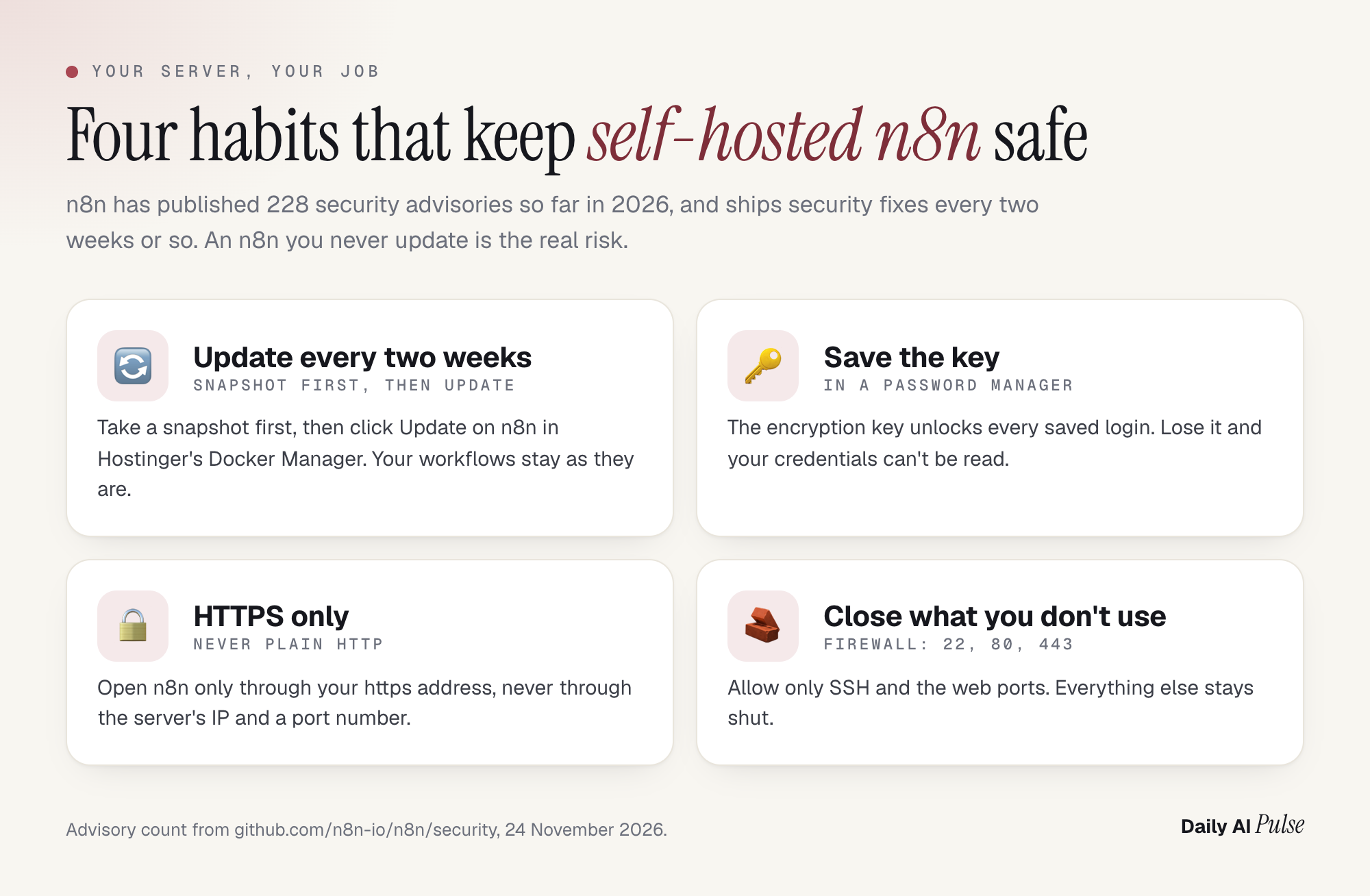
Updates matter more than people expect. n8n has published 228 security advisories so far in 2026, on its GitHub security page. One, disclosed in January 2026, scored the maximum 10 out of 10: on versions 1.65 to 1.120, someone without a login could read files from the server through certain form-based workflows. The fix had already shipped in version 1.121.0 in November 2025, but it only protected people who had updated. n8n's docs ask you to update at least once a month. I'd check every two weeks, because since mid-2026 n8n has published its security fixes in batches about every two weeks.
On Hostinger, a safe update is two clicks. First, take a snapshot in Backups & Monitoring → Snapshots & Backups. A snapshot is a full copy of the server that you can roll back to; Hostinger keeps it for one day. Then open Docker Manager → Projects, click ⋮ next to your n8n project and choose Update. When it's done, Help → About n8n shows the new version.
Hostinger won't do this for you on a VPS. In its own words, "Your VPS only updates when you initiate the process." Its KVM plans do include a free automatic backup every week, which is a good safety net on top of your own. For workflows you can't lose, also keep a copy on your computer: open the workflow and use ⋯ → Export JSON.
For the firewall, Hostinger has one in the panel under Security → Firewall. Once it's switched on it blocks everything, so add accept rules for SSH, HTTP and HTTPS (ports 22, 80 and 443) and nothing else. Because it sits outside your server, it also blocks ports opened behind your back. That matters here: the n8n template opens n8n on an extra port besides HTTPS, and this firewall keeps it closed.
At the time of writing, the stable version is n8n 2.49. n8n 3.0 is out as an early-access release, so stay on the stable version for anything that matters, and read n8n's notes before a major upgrade.
Small problems you might hit
Here are a few common problems, with the fix for each.
| What you see | Why | Fix |
|---|---|---|
| Webhook URL shows the wrong address | n8n doesn't know its public address | Check the WEBHOOK_URL line in the YAML editor and click Deploy |
| A schedule runs at the wrong time | The timezone is still New York | Set the timezone lines to Asia/Kolkata and click Deploy |
| n8n won't open after you changed a setting | A typo in the YAML editor | Check ⋮ → View logs, fix the line, or restore your snapshot |
| "Credentials could not be decrypted" | n8n started with a different encryption key | Restore your snapshot or backup, or the saved key |
| n8n looks stuck after an update | It's updating its database | Wait a few minutes and don't stop it |
Common questions
Is self-hosted n8n really free? The software is free. You pay only for the server. Using it for your own business and building workflows for clients is allowed, as the licence section above explains.
Do I need to know Docker or Linux? No. Hostinger's template installs and runs everything for you. You'll use Hostinger's panel and n8n's own screens, and type a single line once, to copy your encryption key.
Are there any limits when you self host n8n? The free Community Edition has no execution limit. By default n8n keeps the history of past runs for 14 days or 10,000 runs, whichever comes first, to save space. That's history, not a limit on how often workflows run.
How much RAM does n8n need? n8n doesn't publish a minimum. Hostinger's sizing guide sets the minimum at 2 GB and calls 4 to 8 GB the sweet spot. Workflows that move big files or call AI models need more.
Can I try n8n before I pay for a server? Yes. n8n Cloud's free trial lasts 14 days. Build your first workflows there, then move to your own server when you need more executions.
Can I run n8n on a free server? Oracle Cloud's Always Free tier gives a small Arm server in Mumbai or Hyderabad, but free servers can run out of capacity or be taken back when idle, and there's no one-click n8n setup there. Treat it as a playground. Render's free tier is a trap for n8n: it sleeps after 15 minutes and loses your data on restart.
n8n is also where a lot of people build their first AI agents, and those tend to run often, which is exactly when the execution count starts to matter.
Your next step
Pick a KVM plan, choose the n8n template during setup, and set the timezone before you build anything. Then build one small workflow that saves you time this week.
I've put every step in a free PDF guide below: the plan, the one-click install, the three settings, updates, backups, a "what went wrong" table and a launch checklist. Keep it open next to Hostinger's panel and follow along.
Discussion